- Supported mod loaders
- 4
- Fabric · Quilt · Forge · NeoForge
- Supported Minecraft versions
- 9
- 1.20.1 – 26.3
- Official Minecraft Launcher profile
- 1
- No extra launcher needed
- Free and open source
- MIT
- Source code on GitHub
What runs today
Support in Plexus Mod Loader 2.1.0. See Supported versions and loaders and Compatibility for full test results and error codes.
| Minecraft | Plexus Mods | Fabric | Quilt | Forge | NeoForge |
|---|---|---|---|---|---|
| 26.3default | Supported | Supported | Supported | Supported | Supported |
| 26.2 | Supported | Supported | Supported | Supported | Supported |
| 26.1 · 26.1.1 · 26.1.2 | Supported | Supported | Supported | Supported | Supported |
| 1.21.11 · 1.21.1 · 1.20.4 · 1.20.1 | Supported | Most left out | Most left out | Not supported | Not supported |
- Fabric or Quilt with Forge or NeoForgePartial support
- Forge and NeoForge togetherNot yet supported
On Minecraft 1.20.1 through 1.21.11, Forge and NeoForge are unsupported, and most Fabric or Quilt mods are excluded because intermediary names are not yet translated. When combining Fabric or Quilt with Forge or NeoForge, mods with conflicting patches are left out and counted on the title screen.
Fabric
SupportedFabric mods run the way they do in Fabric Loader, without installing Fabric Loader separately.
View test details
Checked with popular Fabric mods on 26.1 and 26.2 (138 mods on 26.2, including Sodium, Iris and Lithium) on the client and dedicated server, and on 26.3 servers (headless, 2026-10-27).
NeoForge
SupportedPlexus Mod Loader runs NeoForge itself, downloading its files automatically on the first launch.
View test details
Checked with popular NeoForge mods on 26.1, 26.1.2 and 26.2 (54 mods on 26.2, including Sodium and Iris) on the client and server, and on 26.3 servers with NeoForge 26.3.0.98 (headless, 2026-10-27).
Forge
SupportedPlexus Mod Loader runs MinecraftForge itself, downloading its files automatically on the first launch.
View test details
Checked with popular Forge mods on 26.1, 26.1.2 and 26.2 (40 mods on 26.2) on the client and server, and on 26.3 servers with Forge 66.1.0 (headless, 2026-10-27).
Quilt
SupportedQuilt mods run with the Quilt Loader API, their Mixins and access wideners—no separate Quilt Loader needed.
View test details
Checked against every Quilt-only build on Modrinth for 26.1, 26.1.2 and 26.2, and on a 26.3 dedicated server (headless, 2026-10-27). Mods that need QSL are left out because QSL has no 26.x release.
Mixing loaders
PartialFabric and Quilt mods can share one game with Forge mods or with NeoForge mods when their game patches fit.
View test details
Mods whose hooks conflict with Forge or NeoForge patches are left out before launch and counted on the title screen (on 26.2: three Fabric mods next to Forge, three Fabric API modules next to NeoForge). Forge and NeoForge cannot share one game yet. Since 1.2.5, mixing loaders works on 26.3 too.
Plexus Mods
SupportedMods built with Plexus Mod Loader’s own version-independent Native API.
View test details
They run in single player and on dedicated servers across all 9 supported Minecraft versions (1.20.1 – 26.3) without rebuilding.
Why Plexus
Four mod ecosystems, one install
Fabric, NeoForge, Forge and Quilt mods usually need separate profiles. Plexus runs all four, and lets you combine Fabric and Quilt mods with Forge or NeoForge mods when their game patches fit.
Clear reasons instead of crashes
Before the game starts, every mod is checked. If a mod cannot run, only that mod is left out—the title screen and the log tell you which one and why, while the rest of your mods still load.
Works in the official launcher
The installer adds a profile straight to the official Minecraft Launcher—no new launcher to learn. The same installer can also set up a dedicated server.
Install in three steps
Download the installer
Grab the universal installer (.jar) for Windows, macOS, or Linux (requires Java 17 or newer).
Run the installer
Start vanilla Minecraft once in the version you want, close the launcher, and click Install.
Pick the profile and play
Select the Plexus Mod Loader profile in the Minecraft Launcher, drop your mods into the mods folder, and play.
In the game
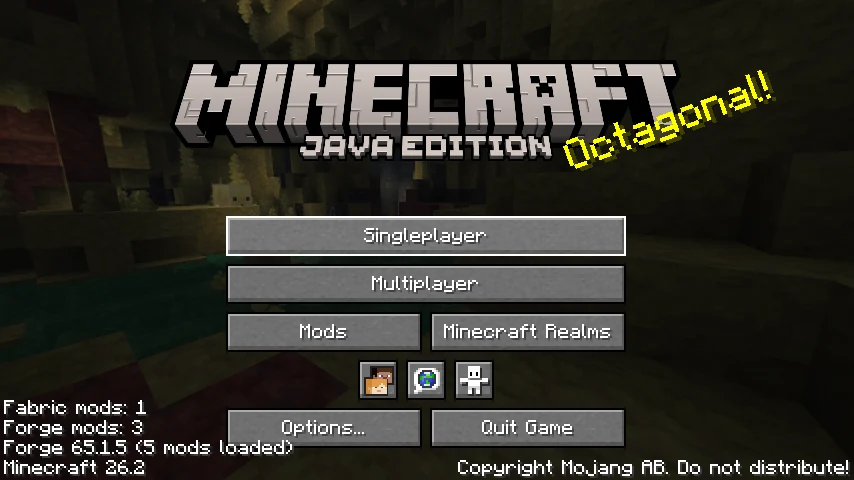
The title screen shows how many mods from each loader are active (and, if any were left out, how many). 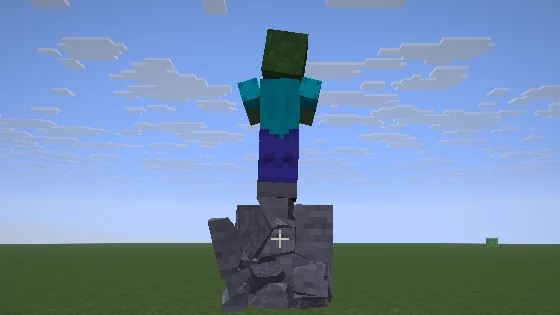
Physics Mod (a Forge mod) breaks a stone block into pieces while Sodium (a Fabric mod) runs in the same game.
Security & Open-Source Transparency
Built with open-source rigor, verified releases, and community trust at its core.
MIT Open Source
All source code is publicly accessible under the MIT License. Inspect, verify, and contribute freely on GitHub.
SHA-256 Checksums
Every release includes cryptographic SHA-256 hashes so you can independently verify installer file integrity.
Documented Architecture
Detailed specifications for classloader topology, bytecode virtualizer, and multi-loader bridges are fully published.
For mod developers: Plexus Mods
Plexus Mods use Plexus Mod Loader’s Native API instead of Minecraft’s internal classes.The API is in preview and can still change between releases.
One build across supported versions
Because the API hides internal Minecraft classes, a mod using only the Native API can declare 1.20.1, 1.20.4, 1.21.1, 1.21.11 and 26.* without rebuilding.
Works next to Fabric mods
Plexus Mods and Fabric mods can depend on each other in the same game.
Errors that say what to fix
An invalid declaration stops at startup with a clear error code, instead of crashing later in a world.
Headless in-game tests
Run automated game tests with mock players on a headless test server straight from Gradle.